• Why am I building an online coaching business?

    Because this is all I have left—my knowledge.

    I’m starting over at 50 after building businesses, losing businesses, making mistakes, and learning lessons I wish someone had taught me years ago.

    Instead of keeping those lessons to myself, I’m sharing everything I know with anyone trying to make better business decisions, build multiple income streams online, and create real financial freedom.

    I’m done waiting until everything is perfect.

    I’m building this coaching business in public—mess, lessons, wins, setbacks, and all.

    If you’re starting over, rebuilding, or finally ready to bet on yourself…

    Come build with me.

    #StartingOver #OnlineCoachingBusiness #BuildInPublic #DigitalBusiness
    Why am I building an online coaching business? Because this is all I have left—my knowledge. I’m starting over at 50 after building businesses, losing businesses, making mistakes, and learning lessons I wish someone had taught me years ago. Instead of keeping those lessons to myself, I’m sharing everything I know with anyone trying to make better business decisions, build multiple income streams online, and create real financial freedom. I’m done waiting until everything is perfect. I’m building this coaching business in public—mess, lessons, wins, setbacks, and all. If you’re starting over, rebuilding, or finally ready to bet on yourself… Come build with me. #StartingOver #OnlineCoachingBusiness #BuildInPublic #DigitalBusiness
    0 Comentários 0 Compartilhamentos 11KB Visualizações 0 Anterior
  • One of the biggest mistakes aspiring coaches make is waiting until they feel “ready.”


    More certifications.


    More courses.


    More followers.


    Meanwhile, someone with less experience is already helping people because they started.


    If you’ve solved a problem, learned a skill, or achieved a result someone else wants, you already have the foundation of an online coaching business.


    The key is building trust before asking for the sale.


    That’s exactly what I break down in my latest article, including how to build an ecosystem where your content, community, coaching, and digital products work together instead of relying on random social media posts.


    Stop trying to become the biggest expert.


    Start becoming the most helpful guide.


    👉 Read the full guide: How to Start an Online Coaching Business (Even If You Don’t Feel Like an Expert Yet).
    https://networq.co/blogs/1484/How-to-Start-an-Online-Coaching-Business-When-You-Don


    Then come back and tell me:


    What’s ONE result you’ve achieved that you could help someone else achieve?


    OnlineCoachingBusiness #OnlineCoach
    One of the biggest mistakes aspiring coaches make is waiting until they feel “ready.” More certifications. More courses. More followers. Meanwhile, someone with less experience is already helping people because they started. If you’ve solved a problem, learned a skill, or achieved a result someone else wants, you already have the foundation of an online coaching business. The key is building trust before asking for the sale. That’s exactly what I break down in my latest article, including how to build an ecosystem where your content, community, coaching, and digital products work together instead of relying on random social media posts. Stop trying to become the biggest expert. Start becoming the most helpful guide. 👉 Read the full guide: How to Start an Online Coaching Business (Even If You Don’t Feel Like an Expert Yet). https://networq.co/blogs/1484/How-to-Start-an-Online-Coaching-Business-When-You-Don Then come back and tell me: What’s ONE result you’ve achieved that you could help someone else achieve? OnlineCoachingBusiness #OnlineCoach
    Wow
    1
    0 Comentários 0 Compartilhamentos 4KB Visualizações 0 Anterior
  • $27.00
    Localização
    Launch and Profit
    Data
    5 Aug - 5 Aug 2026
    Status
    Open
    Everybody says grow your following first. That’s the advice keeping you stuck.

    I built my first paid community with barely any followers — and it still made money. Not luck. A system.

    That’s what’s inside How to Create a Paid Community With Little to No Followers:

    1. The one pain point your niche will pay for

    2. The 3 pages every paid community needs

    3. How to bridge cold traffic in with one Reel + one automation

    4. The Elevator Model — price it floor by floor

    5. Why “earn while you learn” keeps members from disappearing
    No follower minimums. No eligibility requirements. Just the steps.

    Enroll now — module 1 gets your first floor built by next week.
    Everybody says grow your following first. That’s the advice keeping you stuck. I built my first paid community with barely any followers — and it still made money. Not luck. A system. That’s what’s inside How to Create a Paid Community With Little to No Followers: 1. The one pain point your niche will pay for 2. The 3 pages every paid community needs 3. How to bridge cold traffic in with one Reel + one automation 4. The Elevator Model — price it floor by floor 5. Why “earn while you learn” keeps members from disappearing No follower minimums. No eligibility requirements. Just the steps. Enroll now — module 1 gets your first floor built by next week.
    0 Comentários 0 Compartilhamentos 4KB Visualizações 0 Anterior
  • How to build an online community… without giving away all your best knowledge for free


    For years, I thought the only way to grow online was to constantly post, chase views, and hope the algorithm sent the right people my way.


    But here’s what I realized…


    Your knowledge has value.


    Your experience has value.


    The solutions you’ve learned the hard way can become the foundation of a thriving online community.


    Building an online community isn’t just about getting followers. It’s about creating a space where people can learn from you, connect with others, get support, and transform their goals into results.


    Whether you’re a coach, creator, entrepreneur, educator, or someone with a skill people want to learn — you don’t need to post 24/7 to make an impact.


    You need the right community.


    The biggest shift? Stop thinking:
    “I need more followers.”


    Start thinking:
    “How can I create a place where my people want to stay?”


    That’s how you build an online community that can grow into courses, memberships, coaching, and multiple income streams.


    And yes… I was literally creating waves on a mannequin when I had this realization. 😂


    #HowToBuildAnOnlineCommunity #OnlineCommunityBuilder #CommunityBuilding #CreatorEconomy #DigitalProducts #OnlineBusiness #MonetizeYourKnowledge #PaidCommunity
    How to build an online community… without giving away all your best knowledge for free For years, I thought the only way to grow online was to constantly post, chase views, and hope the algorithm sent the right people my way. But here’s what I realized… Your knowledge has value. Your experience has value. The solutions you’ve learned the hard way can become the foundation of a thriving online community. Building an online community isn’t just about getting followers. It’s about creating a space where people can learn from you, connect with others, get support, and transform their goals into results. Whether you’re a coach, creator, entrepreneur, educator, or someone with a skill people want to learn — you don’t need to post 24/7 to make an impact. You need the right community. The biggest shift? Stop thinking: “I need more followers.” Start thinking: “How can I create a place where my people want to stay?” That’s how you build an online community that can grow into courses, memberships, coaching, and multiple income streams. And yes… I was literally creating waves on a mannequin when I had this realization. 😂 #HowToBuildAnOnlineCommunity #OnlineCommunityBuilder #CommunityBuilding #CreatorEconomy #DigitalProducts #OnlineBusiness #MonetizeYourKnowledge #PaidCommunity
    0 Comentários 0 Compartilhamentos 5KB Visualizações 0 Anterior
  • Got it—do you want a quick primer on web hosting basics, or guidance on how to test/evaluate a web host? Here’s a concise overview of both:


    Web hosting basics
    - What it is: A service that stores your website’s files and serves them to visitors over the internet.
    - Common types:
    - Shared: Cheapest, resources shared with others. Good for small sites.
    - Managed WordPress: Shared/VPS with WordPress-specific tuning and support.
    - VPS: Virtual private server; dedicated resources, more control.
    - Dedicated: Entire physical server; high performance, highest cost.
    - Cloud: Scalable virtual machines (AWS, GCP, Azure, DigitalOcean).
    - Key terms:
    - Domain and DNS: Your site’s address and the system that points it to your host.
    - Nameservers: Where your DNS is managed.
    - SSL/TLS: HTTPS encryption; often free via Let’s Encrypt.
    - CDN: Globally caches assets for speed (Cloudflare, Fastly).
    - Control panel: cPanel, Plesk, or a custom dashboard.
    - What a plan usually includes: Disk space, bandwidth, CPU/RAM share, databases, email, SSL, backups, support.
    - Typical flow to launch:
    1) Buy a domain
    2) Point nameservers/DNS to host
    3) Upload site (SFTP/Git) or install CMS
    4) Set up database and environment variables
    5) Enable SSL and caching/CDN
    6) Test and go live


    How to test a web host
    - Performance
    - Speed/TTFB: WebPageTest, GTmetrix, Pingdom, PageSpeed Insights.
    - Load testing: k6, wrk, ApacheBench (ab) to simulate traffic.
    - Example: wrk -t4 -c100 -d30s https://yoursite.com
    - Example: ab -n 1000 -c 50 https://yoursite.com/
    - Geographic latency: test from multiple regions with WebPageTest.
    - Uptime and monitoring
    - UptimeRobot, Better Uptime, StatusCake for 24/7 checks.
    - SSL and security
    - SSL config: Qualys SSL Labs test.
    - Basic headers: securityheaders.com
    - DNS and propagation
    - dig or nslookup to verify records:
    - dig A yourdomain.com +short
    - Server limits/stack
    - PHP/Node/Python versions, HTTP/2 or HTTP/3 support, Brotli/Gzip.
    - Inode limits, CPU throttling, memory constraints.
    - Database performance
    - Run simple queries; check slow query log (if VPS/dedicated).
    - Reliability and support
    - Open a support ticket with a technical question and time the response/quality.
    - Backups and restores
    - Trigger an on-demand backup and test restoring to staging.


    What to look for when choosing
    - Performance: Consistent low TTFB (<200–400 ms) and good P95 response under load.
    - Uptime: 99.9%+ with status page and SLA.
    - Security: Free auto-renewing SSL, WAF or CDN, 2FA, offsite backups.
    - Backups: Daily at minimum, easy restores, retention 7–30 days.
    - Support: 24/7 chat/tickets, real engineers for escalations.
    - Transparency: Clear resource limits, renewal pricing, data center locations.
    - Features: Staging sites, SSH/SFTP, Git deploys, cron jobs.
    - Migration help: Free site migration is a plus.


    Rough pricing guidance
    - Shared/Managed WordPress (small sites): $3–$25/mo promo, renewals higher.
    - VPS (growing sites/apps): $6–$40/mo base + backups, bandwidth.
    - Managed cloud (high-traffic/prod): $50–$200+/mo.


    Security and best practices
    - Enforce HTTPS everywhere; HSTS if stable.
    - Keep CMS/plugins/themes updated; least-privilege access.
    - Use SSH keys, SFTP; enable 2FA.
    - Offsite backups; test restores quarterly.
    - WAF/CDN (e.g., Cloudflare) for DDoS and caching.


    If you share your use case (site type, expected traffic, tech stack, budget, preferred regions), I can recommend a hosting type and a quick testing checklist tailored to you.

    Got it—do you want a quick primer on web hosting basics, or guidance on how to test/evaluate a web host? Here’s a concise overview of both: Web hosting basics - What it is: A service that stores your website’s files and serves them to visitors over the internet. - Common types: - Shared: Cheapest, resources shared with others. Good for small sites. - Managed WordPress: Shared/VPS with WordPress-specific tuning and support. - VPS: Virtual private server; dedicated resources, more control. - Dedicated: Entire physical server; high performance, highest cost. - Cloud: Scalable virtual machines (AWS, GCP, Azure, DigitalOcean). - Key terms: - Domain and DNS: Your site’s address and the system that points it to your host. - Nameservers: Where your DNS is managed. - SSL/TLS: HTTPS encryption; often free via Let’s Encrypt. - CDN: Globally caches assets for speed (Cloudflare, Fastly). - Control panel: cPanel, Plesk, or a custom dashboard. - What a plan usually includes: Disk space, bandwidth, CPU/RAM share, databases, email, SSL, backups, support. - Typical flow to launch: 1) Buy a domain 2) Point nameservers/DNS to host 3) Upload site (SFTP/Git) or install CMS 4) Set up database and environment variables 5) Enable SSL and caching/CDN 6) Test and go live How to test a web host - Performance - Speed/TTFB: WebPageTest, GTmetrix, Pingdom, PageSpeed Insights. - Load testing: k6, wrk, ApacheBench (ab) to simulate traffic. - Example: wrk -t4 -c100 -d30s https://yoursite.com - Example: ab -n 1000 -c 50 https://yoursite.com/ - Geographic latency: test from multiple regions with WebPageTest. - Uptime and monitoring - UptimeRobot, Better Uptime, StatusCake for 24/7 checks. - SSL and security - SSL config: Qualys SSL Labs test. - Basic headers: securityheaders.com - DNS and propagation - dig or nslookup to verify records: - dig A yourdomain.com +short - Server limits/stack - PHP/Node/Python versions, HTTP/2 or HTTP/3 support, Brotli/Gzip. - Inode limits, CPU throttling, memory constraints. - Database performance - Run simple queries; check slow query log (if VPS/dedicated). - Reliability and support - Open a support ticket with a technical question and time the response/quality. - Backups and restores - Trigger an on-demand backup and test restoring to staging. What to look for when choosing - Performance: Consistent low TTFB (<200–400 ms) and good P95 response under load. - Uptime: 99.9%+ with status page and SLA. - Security: Free auto-renewing SSL, WAF or CDN, 2FA, offsite backups. - Backups: Daily at minimum, easy restores, retention 7–30 days. - Support: 24/7 chat/tickets, real engineers for escalations. - Transparency: Clear resource limits, renewal pricing, data center locations. - Features: Staging sites, SSH/SFTP, Git deploys, cron jobs. - Migration help: Free site migration is a plus. Rough pricing guidance - Shared/Managed WordPress (small sites): $3–$25/mo promo, renewals higher. - VPS (growing sites/apps): $6–$40/mo base + backups, bandwidth. - Managed cloud (high-traffic/prod): $50–$200+/mo. Security and best practices - Enforce HTTPS everywhere; HSTS if stable. - Keep CMS/plugins/themes updated; least-privilege access. - Use SSH keys, SFTP; enable 2FA. - Offsite backups; test restores quarterly. - WAF/CDN (e.g., Cloudflare) for DDoS and caching. If you share your use case (site type, expected traffic, tech stack, budget, preferred regions), I can recommend a hosting type and a quick testing checklist tailored to you.

    Love
    1
    0 Comentários 0 Compartilhamentos 2KB Visualizações 0 Anterior
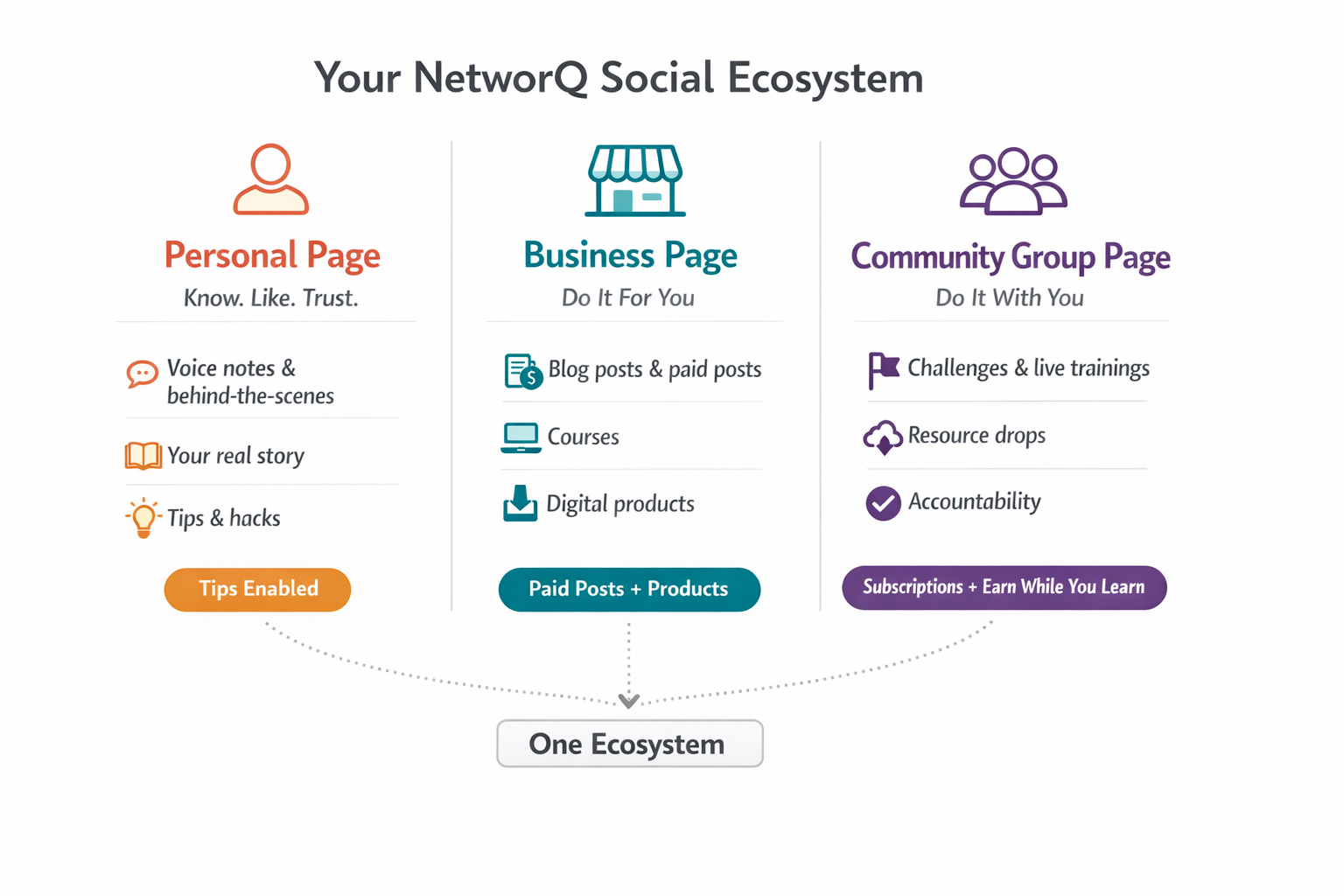
  • Stop Thinking "Platform." Start Thinking "Paid Community Ecosystem."


    Ecosystem over platform: NetworQ Social isn't a sales funnel — it's a system that pays you starting with post one. It runs on three pages, each with a different job:


    Personal Page builds Know-Like-Trust (your story, behind-the-scenes)


    Business Page is where people buy (courses, products, paid posts)


    Community Group is where your people stay and get held accountable ("do it with you").


    Cramming all three jobs onto one profile is why people follow, watch, and never buy.


    Pay members to stay: The retention hook is real cash, not badges — members earn points (that convert to money) for posting, commenting, and showing up, and coaches earn just for posting.


    Framed as a small stipend that gives people a financial reason not to ghost the group after week two, flipping retention from something you beg for into something built in.
    Stop Thinking "Platform." Start Thinking "Paid Community Ecosystem." Ecosystem over platform: NetworQ Social isn't a sales funnel — it's a system that pays you starting with post one. It runs on three pages, each with a different job: Personal Page builds Know-Like-Trust (your story, behind-the-scenes) Business Page is where people buy (courses, products, paid posts) Community Group is where your people stay and get held accountable ("do it with you"). Cramming all three jobs onto one profile is why people follow, watch, and never buy. Pay members to stay: The retention hook is real cash, not badges — members earn points (that convert to money) for posting, commenting, and showing up, and coaches earn just for posting. Framed as a small stipend that gives people a financial reason not to ghost the group after week two, flipping retention from something you beg for into something built in.
    0 Comentários 0 Compartilhamentos 3KB Visualizações 0 Anterior
  • When cutting the sides and nape of a quick weave I like to make a guideline first going around the shape, then I take my favorite feather razor and lightly stroke downwards lifting the hairs underneath to the guideline.

    This will give a seamless blend.

    If this helped a tip will be greatly appreciated so I can continue to give you free game like this.

    You can watch the full video here: https://networq.co/posts/1437
    When cutting the sides and nape of a quick weave I like to make a guideline first going around the shape, then I take my favorite feather razor and lightly stroke downwards lifting the hairs underneath to the guideline. This will give a seamless blend. If this helped a tip will be greatly appreciated so I can continue to give you free game like this. You can watch the full video here: https://networq.co/posts/1437
    0 Comentários 0 Compartilhamentos 6KB Visualizações 5 0 Anterior
  • How to Shape Shift a Quick Weave — Precision Cutting Tutorial

    Every quick weave starts as an inspiration image. What separates a good install from a great hairstyle is what happens AFTER — the precision cutting, the track placement, the shaping.

    I call it Shape Shifting.

    I’ve been perfecting this technique for four years. No formal training and no one showed me this. I figured it out myself — and now I’m teaching it to you step by step.

    In this tutorial you’ll learn:

    ✂️ Precision cutting techniques for clean shapes
    💇🏾‍♀️ Strategic track placement for a natural look
    🎨 How to shape the style to fit your client’s face
    ⚡ How to cut your install time in half
    🔁 How to make units removable or permanent

    Also included:
    📐 Hair cutting diagram so you can follow along visually

    🛍️ Full product list — exactly what I use and where to get it

    💵 Pricing list so you know exactly what to charge for this service

    This is the same technique I use on real clients at Shanny’s Natural Beauty in Brooklyn, New York. This is the actual process from start to finish.

    If you’re a stylist who wants to add a faster, more profitable service to your menu — this is your starting point.

    Get instant access for a one time payment of just $17.👇
    How to Shape Shift a Quick Weave — Precision Cutting Tutorial Every quick weave starts as an inspiration image. What separates a good install from a great hairstyle is what happens AFTER — the precision cutting, the track placement, the shaping. I call it Shape Shifting. I’ve been perfecting this technique for four years. No formal training and no one showed me this. I figured it out myself — and now I’m teaching it to you step by step. In this tutorial you’ll learn: ✂️ Precision cutting techniques for clean shapes 💇🏾‍♀️ Strategic track placement for a natural look 🎨 How to shape the style to fit your client’s face ⚡ How to cut your install time in half 🔁 How to make units removable or permanent Also included: 📐 Hair cutting diagram so you can follow along visually 🛍️ Full product list — exactly what I use and where to get it 💵 Pricing list so you know exactly what to charge for this service This is the same technique I use on real clients at Shanny’s Natural Beauty in Brooklyn, New York. This is the actual process from start to finish. If you’re a stylist who wants to add a faster, more profitable service to your menu — this is your starting point. Get instant access for a one time payment of just $17.👇
    Tipo de arquivo: pdf
    0 Comentários 0 Compartilhamentos 6KB Visualizações 0 Anterior
  • Im using the wrapping paper for gift baskets called shrink wrap https://a.co/d/03YiqdTc to prep my canvas head for wig making. These steps will prevent product spillage and give you a smooth surface when styling a short pixie wig. Here is the steps in order of the images. If you would like to see the full step by step tutorial join my community https://networq.co/groups/salonqualitywigs

    Step 1: Use a heat gun and cellophane wrap (https://a.co/d/0160bUd3)

    Step 2: Secure the wrap with push needles, I use the ones with a pearlized ball head (https://a.co/d/08noqGEx)

    Step 3: Gently direct the hot glue gun facing down towards the canvas head in 1 second intervals per spot.

    Step 4: Press your hand over the hot aired section immediately to force the mold

    Step 5: Use clear tape to fill any holes created to the shrink wrap from the hot glu gun.

    There you have it, your canvas head is now prepped and ready for for custom wig making and safe from products like hair dyes, gel etc.

    If this helped a tip will allow me to continue sharing these free wig making hacks and tips.
    Im using the wrapping paper for gift baskets called shrink wrap https://a.co/d/03YiqdTc to prep my canvas head for wig making. These steps will prevent product spillage and give you a smooth surface when styling a short pixie wig. Here is the steps in order of the images. If you would like to see the full step by step tutorial join my community https://networq.co/groups/salonqualitywigs Step 1: Use a heat gun and cellophane wrap (https://a.co/d/0160bUd3) Step 2: Secure the wrap with push needles, I use the ones with a pearlized ball head (https://a.co/d/08noqGEx) Step 3: Gently direct the hot glue gun facing down towards the canvas head in 1 second intervals per spot. Step 4: Press your hand over the hot aired section immediately to force the mold Step 5: Use clear tape to fill any holes created to the shrink wrap from the hot glu gun. There you have it, your canvas head is now prepped and ready for for custom wig making and safe from products like hair dyes, gel etc. If this helped a tip will allow me to continue sharing these free wig making hacks and tips.
    0 Comentários 0 Compartilhamentos 6KB Visualizações 0 Anterior
  • Before you run paid ads to your digital products…

    You need to understand this:

    👉 You don’t just need a funnel.
    👉 You need a value ecosystem.

    Why this works

    ✔️ Free training builds trust
    ✔️ Tripwire turns strangers into buyers
    ✔️ Order bump increases value
    ✔️ Community keeps them in your ecosystem

    You’re not trying to make one sale.

    👉 You’re building a system that keeps selling.

    join the Creator Mastermind if you’re ready to build this with support.

    https://networq.co/groups/creator_mastermind
    Before you run paid ads to your digital products… You need to understand this: 👉 You don’t just need a funnel. 👉 You need a value ecosystem. Why this works ✔️ Free training builds trust ✔️ Tripwire turns strangers into buyers ✔️ Order bump increases value ✔️ Community keeps them in your ecosystem You’re not trying to make one sale. 👉 You’re building a system that keeps selling. join the Creator Mastermind if you’re ready to build this with support. https://networq.co/groups/creator_mastermind
    1 Comentários 0 Compartilhamentos 7KB Visualizações 0 Anterior
  • I don't sell digital products.

    I sell repeatable systems that help digital product sellers, course creators, and professionals who sell knowledge gain clarity and increase sales

    The digital product is just the format I deliver the solution.

    Customers don't care about that, all they care about getting their problems solved, that's it.
    I don't sell digital products. I sell repeatable systems that help digital product sellers, course creators, and professionals who sell knowledge gain clarity and increase sales The digital product is just the format I deliver the solution. Customers don't care about that, all they care about getting their problems solved, that's it.
    0 Comentários 0 Compartilhamentos 14KB Visualizações 0 Anterior
  • $27.00
    Localização
    Creator Mastermind
    Data
    14 Mar - 18 Mar 2026
    Status
    Open
    This transformation course shows creators, coaches, and digital product beginners how to turn their knowledge into a simple income system. https://networq.co


    Inside, you’ll learn how to position your expertise, set up a monetized creator profile, package your knowledge into an offer, and track your first $100 in earnings.


    If you’ve been posting content but struggling to turn it into income, this training gives you the step-by-step blueprint to move from idea to real cashflow.


    Before:

    Confused about how to make money online with your knowledge.


    After:

    You have a clear monetization setup, a positioned offer, and a roadmap to earning your first $100 and building real cashflow.
    This transformation course shows creators, coaches, and digital product beginners how to turn their knowledge into a simple income system. https://networq.co Inside, you’ll learn how to position your expertise, set up a monetized creator profile, package your knowledge into an offer, and track your first $100 in earnings. If you’ve been posting content but struggling to turn it into income, this training gives you the step-by-step blueprint to move from idea to real cashflow. Before: Confused about how to make money online with your knowledge. After: You have a clear monetization setup, a positioned offer, and a roadmap to earning your first $100 and building real cashflow.
    0 Comentários 0 Compartilhamentos 6KB Visualizações 0 Anterior
Páginas impulsionada
NetworQ Social -Build a Community That Learns, Shares, and Earns https://networq.co