


You’re about to open a link:

You're about to open an external website. Be cautious and keep your personal information safe.

Open anyway
  • How do you promote a course on NetworQ Social?

    NetworQ Social allows creators and educators to promote their courses by creating a course listing that describes the training and directs people to where the course is hosted.

    Instead of building the course directly inside the platform, the course listing acts as a discovery page where potential students can learn about your training and follow instructions to join.

    How it works

    1️⃣ Click Create Course from the post menu
    2️⃣ Add the course title, description, and category
    3️⃣ Use the Location field to link where the course will be hosted
    4️⃣ Upload a cover image for the training
    5️⃣ Publish the listing so your audience can discover and enroll

    This allows educators to use NetworQ Social as a promotion and discovery tool while hosting the actual lessons inside a community group, private training, or external platform.

    #CourseCreators
    #contentcreation
    How do you promote a course on NetworQ Social? NetworQ Social allows creators and educators to promote their courses by creating a course listing that describes the training and directs people to where the course is hosted. Instead of building the course directly inside the platform, the course listing acts as a discovery page where potential students can learn about your training and follow instructions to join. How it works 1️⃣ Click Create Course from the post menu 2️⃣ Add the course title, description, and category 3️⃣ Use the Location field to link where the course will be hosted 4️⃣ Upload a cover image for the training 5️⃣ Publish the listing so your audience can discover and enroll This allows educators to use NetworQ Social as a promotion and discovery tool while hosting the actual lessons inside a community group, private training, or external platform. #CourseCreators #contentcreation
    0 Comments 0 Shares 755 Views 1 0 Reviews

  • Going live on NetworQ Social is one of the fastest ways to build trust with your audience and turn real-time conversations into paying clients.

    Instead of posting content and hoping someone clicks a link, live streaming allows you to teach, answer questions, and guide viewers toward your next step in real time.

    Here’s how creators are using Live on NetworQ Social strategically.

    Step 1: Start Your Live Session

    Go to the post creator and select Go Live. This opens your live dashboard where you can check your camera, microphone, and streaming setup before starting.

    Step 2: Choose Your Live Type

    NetworQ Social allows you to structure your live depending on your goal.

    You can:
    • Go Live for free to attract new viewers
    • Host Subscribers Only lives for exclusive community training
    • Create a Paid Live session for workshops, coaching, or premium content

    This turns live streaming into a monetization tool, not just content.

    Step 3: Teach One Clear Solution

    The most effective lives focus on solving a specific problem your audience already has.

    Start by explaining the problem.
    Then show one quick strategy or insight that helps people move forward.

    When viewers get a quick win, they trust your expertise.

    Step 4: Guide Viewers to the Next Step

    At the end of your live, invite viewers to take action.

    That action could be:
    • joining your subscriber community
    • attending a paid live training
    • booking a consultation
    • purchasing your offer

    This creates a structured customer journey instead of random content posting.

    Why Live Content Works

    Live video builds credibility faster than static content because people can see your expertise in real time.

    Instead of chasing algorithms, you’re creating real engagement and real conversations with your audience.

    And when you combine that with clear offers, your live sessions become a powerful way to turn attention into income.

    Tip:
    Creators who consistently go live to teach, answer questions, and guide viewers to the next step often build stronger communities and higher client conversions.

    #CreatorMonetization
    Going live on NetworQ Social is one of the fastest ways to build trust with your audience and turn real-time conversations into paying clients. Instead of posting content and hoping someone clicks a link, live streaming allows you to teach, answer questions, and guide viewers toward your next step in real time. Here’s how creators are using Live on NetworQ Social strategically. Step 1: Start Your Live Session Go to the post creator and select Go Live. This opens your live dashboard where you can check your camera, microphone, and streaming setup before starting. Step 2: Choose Your Live Type NetworQ Social allows you to structure your live depending on your goal. You can: • Go Live for free to attract new viewers • Host Subscribers Only lives for exclusive community training • Create a Paid Live session for workshops, coaching, or premium content This turns live streaming into a monetization tool, not just content. Step 3: Teach One Clear Solution The most effective lives focus on solving a specific problem your audience already has. Start by explaining the problem. Then show one quick strategy or insight that helps people move forward. When viewers get a quick win, they trust your expertise. Step 4: Guide Viewers to the Next Step At the end of your live, invite viewers to take action. That action could be: • joining your subscriber community • attending a paid live training • booking a consultation • purchasing your offer This creates a structured customer journey instead of random content posting. Why Live Content Works Live video builds credibility faster than static content because people can see your expertise in real time. Instead of chasing algorithms, you’re creating real engagement and real conversations with your audience. And when you combine that with clear offers, your live sessions become a powerful way to turn attention into income. Tip: Creators who consistently go live to teach, answer questions, and guide viewers to the next step often build stronger communities and higher client conversions. #CreatorMonetization
    0 Comments 0 Shares 748 Views 1 0 Reviews
  • Going live on NetworQ Social isn’t just about showing up…

    it’s about teaching in real time, connecting deeper, and letting your community support you while you do it 🎥💰

    In this step-by-step walkthrough, I’ll show you exactly how to:

    ✨ Start your live
    ✨ Turn on tips
    ✨ Go subscribers-only
    ✨ Or host a paid live session

    These are clear steps so you can focus on sharing value, building trust, and letting your livestream actually work for you.

    Are you going live first to teach, sell, or build community? 👇

    #NetworQSocial #GoLive #LivestreamTutorial #CreatorTools #OnlineCoaches #DigitalCreators #MonetizeYourKnowledge #CreatorIncome #TeachAndEarn #BuildYourCommunity
    Going live on NetworQ Social isn’t just about showing up… it’s about teaching in real time, connecting deeper, and letting your community support you while you do it 🎥💰 In this step-by-step walkthrough, I’ll show you exactly how to: ✨ Start your live ✨ Turn on tips ✨ Go subscribers-only ✨ Or host a paid live session These are clear steps so you can focus on sharing value, building trust, and letting your livestream actually work for you. Are you going live first to teach, sell, or build community? 👇 #NetworQSocial #GoLive #LivestreamTutorial #CreatorTools #OnlineCoaches #DigitalCreators #MonetizeYourKnowledge #CreatorIncome #TeachAndEarn #BuildYourCommunity
    0 Comments 0 Shares 3K Views 0 Reviews
  • Want to make your NetworQ Social profile or page look professional? 👀

    Here’s a quick tutorial on how to upload your NetworQ Social banner (cover photo) so your page stands out, builds credibility, and feels like a real brand.

    Follow these simple steps ⬇️

    1️⃣ Go to your NetworQ Social profile or page
    2️⃣ Click the camera icon on the banner area
    3️⃣ Select Upload Photo
    4️⃣ Choose your banner image (best size: 1114 x 354 px)
    5️⃣ Drag to adjust your cover photo
    6️⃣ Click Save / Update to publish your banner

    Your NetworQ Social banner is one of the first things people see — it helps you attract followers, position yourself as an expert, and create a strong first impression.

    If you’re serious about growing on NetworQ Social, optimize your banner area first.

    🚀 Want more NetworQ Social tutorials, creator setup tips, and branding help?
    Follow for more step-by-step guides. #networqsocialtutorials
    Want to make your NetworQ Social profile or page look professional? 👀 Here’s a quick tutorial on how to upload your NetworQ Social banner (cover photo) so your page stands out, builds credibility, and feels like a real brand. Follow these simple steps ⬇️ 1️⃣ Go to your NetworQ Social profile or page 2️⃣ Click the camera icon on the banner area 3️⃣ Select Upload Photo 4️⃣ Choose your banner image (best size: 1114 x 354 px) 5️⃣ Drag to adjust your cover photo 6️⃣ Click Save / Update to publish your banner Your NetworQ Social banner is one of the first things people see — it helps you attract followers, position yourself as an expert, and create a strong first impression. If you’re serious about growing on NetworQ Social, optimize your banner area first. 🚀 Want more NetworQ Social tutorials, creator setup tips, and branding help? Follow for more step-by-step guides. #networqsocialtutorials
    0 Comments 0 Shares 1K Views 2 0 Reviews
  • Most platforms teach you to:
    post more
    engage more
    give more

    …and hope it turns into income later.

    On NetworQ Social, you can:
    ✔️ create a monthly subscription
    ✔️ monetize posts directly
    ✔️ earn from engagement, not just attention

    This video walks you through exactly how to set up recurring income — step by step.

    And if you want:
    • tips
    • walkthroughs
    • monetization strategies
    • real examples from creators building right now

    👉 Join the FREE NetworQ Social Creator Mastermind -No influencer energy. Just systems that work. #howtonetworqsocial
    Most platforms teach you to: post more engage more give more …and hope it turns into income later. On NetworQ Social, you can: ✔️ create a monthly subscription ✔️ monetize posts directly ✔️ earn from engagement, not just attention This video walks you through exactly how to set up recurring income — step by step. And if you want: • tips • walkthroughs • monetization strategies • real examples from creators building right now 👉 Join the FREE NetworQ Social Creator Mastermind -No influencer energy. Just systems that work. #howtonetworqsocial
    0 Comments 0 Shares 1K Views 0 0 Reviews
  • MUST WATCH!!!

    Other platforms pay attention to who gets seen.
    NetworQ Social pays attention to who contributes.

    If you’re an online coach, course creator, or digital product seller tired of teaching for free and hoping the algorithm converts…

    This explainer breaks down why the old model is broken — and how learning in public, rewarded engagement, and real participation change everything.

    This isn’t about posting more.
    It’s about building momentum that compounds.

    Welcome to NetworQ Social.
    Where learning lives in the feed.

    #networqsocial
    MUST WATCH!!! Other platforms pay attention to who gets seen. NetworQ Social pays attention to who contributes. If you’re an online coach, course creator, or digital product seller tired of teaching for free and hoping the algorithm converts… This explainer breaks down why the old model is broken — and how learning in public, rewarded engagement, and real participation change everything. This isn’t about posting more. It’s about building momentum that compounds. Welcome to NetworQ Social. Where learning lives in the feed. #networqsocial
    0 Comments 0 Shares 1K Views 3 0 Reviews
  • Where else do learners EARN while they LEARN?
    Only on NetworQ Social. 💰📚✨🤷🏽‍♀️
    Where else do learners EARN while they LEARN? Only on NetworQ Social. 💰📚✨🤷🏽‍♀️
    1 Comments 0 Shares 2K Views 0 Reviews
  • The biggest mindset shift you’ll ever make?

    Realizing that “posting for free” is still work — you’re just not getting paid for it yet.

    NetworQ Social flips that script. #EarnWhileYouLearn #MonetizeYourKnowledge
    The biggest mindset shift you’ll ever make? Realizing that “posting for free” is still work — you’re just not getting paid for it yet. NetworQ Social flips that script. #EarnWhileYouLearn #MonetizeYourKnowledge
    0 Comments 0 Shares 3K Views 0 Reviews
  • You’ve been giving away your value for free on other platforms — not anymore.

    In this first module of Monetize Like a Pro, I’ll walk you step-by-step through:

    ✅ Creating your NetworQ Social account
    ✅ Optimizing your profile bio for discovery
    ✅ Enabling monetization so you can start earning from day one

    This is your foundation — your setup to success.

    By the end of this lesson, you’ll have a verified, monetized profile that actually pays you for teaching, sharing, and showing up.

    🎥 Join the Creator Mastermind Group to watch the full course ---> https://networq.co/groups/creator_mastermind or follow along now.


    You’ve been giving away your value for free on other platforms — not anymore. In this first module of Monetize Like a Pro, I’ll walk you step-by-step through: ✅ Creating your NetworQ Social account ✅ Optimizing your profile bio for discovery ✅ Enabling monetization so you can start earning from day one This is your foundation — your setup to success. By the end of this lesson, you’ll have a verified, monetized profile that actually pays you for teaching, sharing, and showing up. 🎥 Join the Creator Mastermind Group to watch the full course ---> https://networq.co/groups/creator_mastermind or follow along now.
    Like
    1
    0 Comments 0 Shares 2K Views 2 0 Reviews
  • Posting Reels on NetworQ Social is easy once you know where everything is.

    Use this walkthrough to upload your content, schedule it, or even turn it into a paid post.

    Creators deserve tools that let them earn on their own terms — and that’s exactly what this platform gives you.

    #UploadReels #CreatorMastermind
    Posting Reels on NetworQ Social is easy once you know where everything is. Use this walkthrough to upload your content, schedule it, or even turn it into a paid post. Creators deserve tools that let them earn on their own terms — and that’s exactly what this platform gives you. #UploadReels #CreatorMastermind
    0 Comments 0 Shares 2K Views 0 Reviews
  • Take a quick 30-second tour of NetworQ Social — the all-in-one platform built for the Creator Economy.

    See how easy it is to monetize your posts, earn from engagement, and build your own paid community — all in one place.

    Let’s Learn. Teach. Earn. Together.

    #NetworQSocial #CreatorEconomy
    Take a quick 30-second tour of NetworQ Social — the all-in-one platform built for the Creator Economy. See how easy it is to monetize your posts, earn from engagement, and build your own paid community — all in one place. Let’s Learn. Teach. Earn. Together. #NetworQSocial #CreatorEconomy
    Like
    1
    0 Comments 0 Shares 3K Views 6 0 Reviews
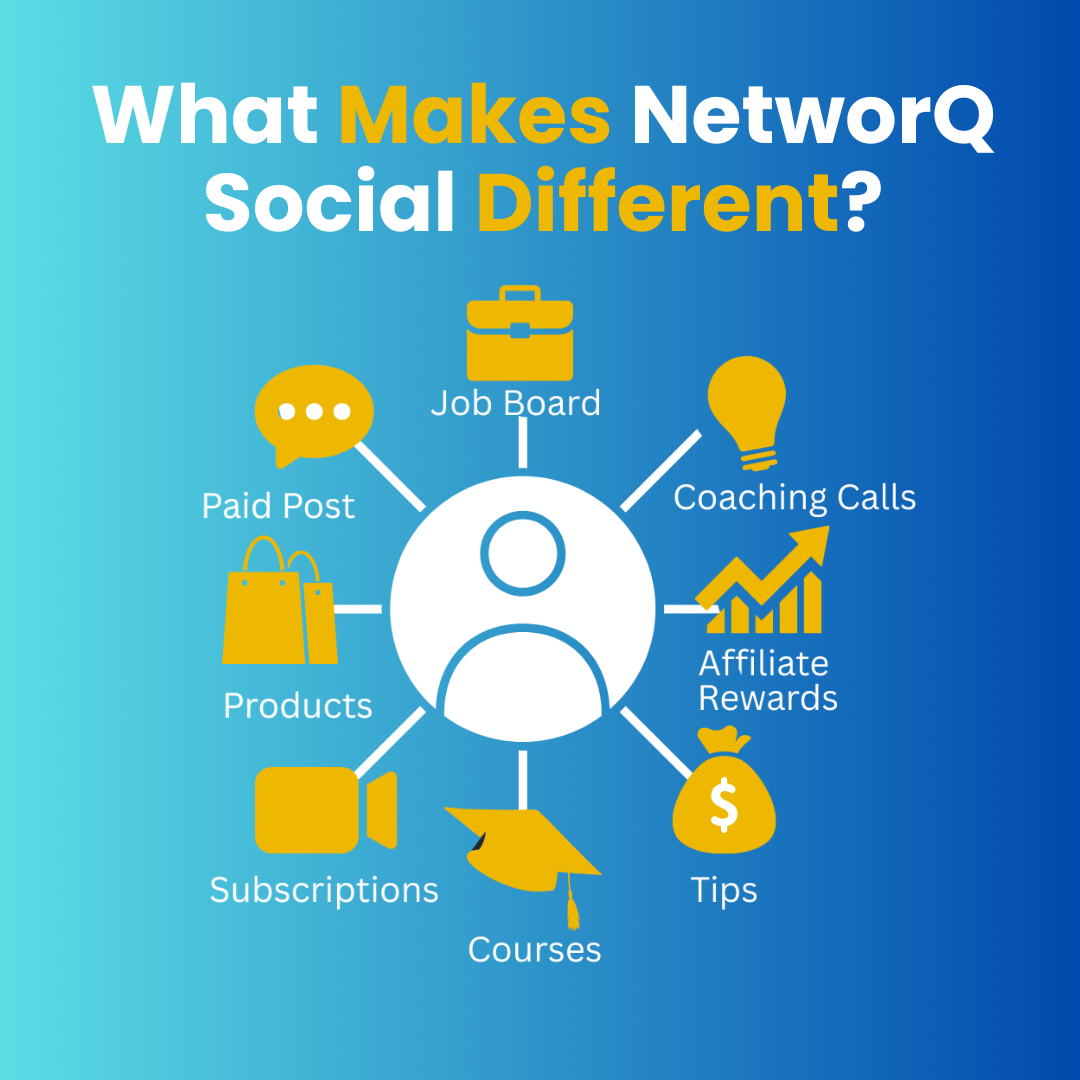
  • What Makes NetworQ Social Different?🤔

    Every platform gives you one way to earn.
    We give you eight.💥

    The more you engage, the more you earn.
    You are the algorithm here.📈
    What Makes NetworQ Social Different?🤔 Every platform gives you one way to earn. We give you eight.💥 The more you engage, the more you earn. You are the algorithm here.📈
    0 Comments 0 Shares 776 Views 0 Reviews
More Results
NetworQ Social | Learn, Teach & Earn Together https://networq.co